Scheduling of periodic tasks
Introduction
You have built your first Zephyr RTOS applications, understood the basic principles behind it and started to put in place methodologies for robust and safe development. When developing real-time applications with a RTOS, a very important aspect is the understanding of scheduling. Real-time applications must guarantee that each task is completed within its deadline.
In this codelab, we address the problem of scheduling periodic tasks. To do so, we apply the Rate Monotonic (RM) algorithm, a fixed priority-based algorithm, and demonstrate how Zephyr RTOS must be configured to execute periodic tasks based on RM.
What you’ll build
In this codelab, you will build an application with several periodic tasks and implement Rate Monotonic scheduling.
What you’ll learn
- The basic principles of the Zephyr RTOS scheduler.
- How to configure the Zephyr RTOS scheduler for applying a rate monotonic algorithm.
- How event recording can be used for analyzing the dynamic behavior of the program schedule.
What you’ll need
- You need to have finished the Digging into Zephyr RTOS.
- You need to have completed the Robust Development Methodologies (I) codelab.
Starting Point and Project Structure
For this codelab, start a new project named “car_system”. It is important to take a modular approach when developing the application, as well as to structure the project. To maintain simplicity and uniformity, apply the project structure documented in the code snippets of the different codelabs.
Implement a program using Monotonic Rate Scheduling
We wish to implement a multi-tasking program that uses Monotonic Rate Scheduling. For this purpose, we choose the set of tasks as described in this exercise.
Activate assertions
As detailed in the digging into Zephy codelab, activating the __ASSERT() mechanism is required during development.
__ASSERT() must be disabled for production builds, but they are used extensively during development to detect invalid configurations or conditions. For example, calling a mutex from an ISR
is not detected when the __ASSERT() mechanism is disabled! In this codelab, you will need to configure
the CONFIG_ZPP_THREAD_POOL_SIZE configuration parameter. A wrong configuration is only detected
when __ASSERT() are enabled.
The entire system is implemented in a CarSystem class. Each task is executed by a separate thread and corresponds to a specific method of the CarSystem class. In this first implementation, the task behavior is identical for each task and we implement them with the same CarSystem::task_method(). The skeleton of the CarSystem class definition is given below:
CarSystem header file
// Copyright 2025 Haute école d'ingénierie et d'architecture de Fribourg
//
// Licensed under the Apache License, Version 2.0 (the "License");
// you may not use this file except in compliance with the License.
// You may obtain a copy of the License at
//
//     http://www.apache.org/licenses/LICENSE-2.0
//
// Unless required by applicable law or agreed to in writing, software
// distributed under the License is distributed on an "AS IS" BASIS,
// WITHOUT WARRANTIES OR CONDITIONS OF ANY KIND, either express or implied.
// See the License for the specific language governing permissions and
// limitations under the License.

/****************************************************************************
 * @file car_system.hpp
 * @author Serge Ayer <serge.ayer@hefr.ch>
 *
 * @brief Car System header file
 *
 * @date 2025-07-01
 * @version 1.0.0
 ***************************************************************************/

#pragma once

// stl
#include <atomic>

// zpp_lib
#include "zpp_include/barrier.hpp"
#include "zpp_include/non_copyable.hpp"
#include "zpp_include/thread.hpp"
#include "zpp_include/zephyr_result.hpp"

// local
#include "periodic_task_info.hpp"

namespace car_system {

using std::literals::chrono_literals::operator""ms;

class CarSystem : private zpp_lib::NonCopyable<CarSystem> {
 public:
  // constructor
  CarSystem();

  // destructor
  ~CarSystem() = default;

  // method called in main() for starting the system
  // the method wait for all threads to end and does not
  // return before stop() is called
  [[nodiscard]] zpp_lib::ZephyrResult start();

  // method called for stopping the system
  void stop();

 private:
  // task related methods
  void task_method(uint8_t taskIndex);

  // Task related data members (one thread per task)
  static constexpr uint8_t kNbrOfPeriodicTasks = 3;
  static constexpr uint8_t kTaskIndex1         = 0;
  static constexpr uint8_t kTaskIndex2         = 1;
  static constexpr uint8_t kTaskIndex3         = 2;
  zpp_lib::Thread _threads[kNbrOfPeriodicTasks];
  static constexpr PeriodicTaskInfo _taskInfos[kNbrOfPeriodicTasks] = {
      // TODO(student): initialize _taskInfos based on task definitions (WCE, Period,
      // Priority,
      // Name)
  };
  std::function<void()> _taskMethods[kNbrOfPeriodicTasks] = {
      // TODO(student): initialize _taskMethods so that each thread receives the
      // appropriate
      // TaskInfo
  };
  // Barrier used to synchronize all threads at startup
  static constexpr uint8_t kNbrOfSemaphoreAcquires = kNbrOfPeriodicTasks;
  zpp_lib::Barrier _barrier{kNbrOfSemaphoreAcquires};
  // stop flag, used for stopping each task (set in stop())
  std::atomic<bool> _stopFlag = false;
};

}  // namespace car_system
The definition of the PeriodicTaskInfo structure is given below:
PeriodicTaskInfo header file
// Copyright 2025 Haute école d'ingénierie et d'architecture de Fribourg
//
// Licensed under the Apache License, Version 2.0 (the "License");
// you may not use this file except in compliance with the License.
// You may obtain a copy of the License at
//
//     http://www.apache.org/licenses/LICENSE-2.0
//
// Unless required by applicable law or agreed to in writing, software
// distributed under the License is distributed on an "AS IS" BASIS,
// WITHOUT WARRANTIES OR CONDITIONS OF ANY KIND, either express or implied.
// See the License for the specific language governing permissions and
// limitations under the License.

/****************************************************************************
 * @file periodic_task_info.hpp
 * @author Serge Ayer <serge.ayer@hefr.ch>
 *
 * @brief Periodic Task Info definition
 *
 * @date 2025-07-01
 * @version 1.0.0
 ***************************************************************************/

#pragma once

// std
#include <chrono>

// zpp_lib
#include "zpp_include/mutex.hpp"
#include "zpp_include/types.hpp"

namespace car_system {

#if CONFIG_PRIORITY_INVERSION
struct SubtaskComputationInfo {
  std::chrono::milliseconds _computationTime;
  zpp_lib::Mutex* _pMutex;
};
static constexpr uint8_t NbrOfSubTasks = 3;
#endif  // CONFIG_PRIORITY_INVERSION

struct PeriodicTaskInfo {
#if CONFIG_PRIORITY_INVERSION
  SubtaskComputationInfo _subTasks[NbrOfSubTasks];
#else   // CONFIG_PRIORITY_INVERSION
  std::chrono::milliseconds _computationTime;
#endif  // CONFIG_PRIORITY_INVERSION
  std::chrono::milliseconds _period;
  zpp_lib::PreemptableThreadPriority _priority;
  const char* _szTaskName;
};

}  // namespace car_system
In this definition, the attribute _taskInfos contains the required information for each task and the attribute _taskMethods contains the function used when starting each thread. Each thread will thus be started using:
auto res = _threads[taskIndex].start(_taskMethods[taskIndex]);
After completing the TODO in the CarSystem class definition, you must implement the class in the car_system.cpp file. The following points are important for a correct implementation:
- In the
CarSystemclass constructor, you need to initialize each thread instance such that each thread gets its name and priority at construction. -
The
CarSystem::start()method implements the following behavior:- It first starts all threads by calling the
zpp_lib::Thread::start()method on each thread instance (in a loop). - It then release the
_startSemaphoreby calling thezpp_lib::Semaphore::release()method. It does it in a loop, once for each thread.
- It first starts all threads by calling the
-
To start the threads synchronously, each task/thread should receive the same initial time and be ready to start simultaneously. This can be accomplished using a barrier mechanism, in which the last thread to enter the barrier initializes the common start time and releases the other threads, allowing them to start. You can implement this mechanism yourself or use the
zpp_lib::Barrierclass. If you choose the latter, add azpp_lib::Barrierattribute to theCarSystemclass. Then, have each thread callBarrier::wait()at startup to synchronize and register the common start time:It is important that all tasks are synchronized at startup because they all operate with a phase \(\Phi = 0\). This is mandatory, because the Rate Monotonic Algorithm assumes that the phase of all task periods is \(0\).// synchronize with other threads and register the start time std::chrono::milliseconds ... = std::chrono::duration_cast<std::chrono::milliseconds>(_barrier.wait()); -
After synchronizing on the barrier and initializing the start time of the next period as the current time (which corresponds to time \(0\) for all tasks), the task method implements an infinite loop that:
- Performs a busy wait for simulating computation (using
zpp_lib::ThisThread::busy_wait()). - Calculates the next period start time and sleeps until this time is reached (using
zpp_lib::ThisThread::sleep_until()). - Exits the infinite loop when the stop flag is set.
- Performs a busy wait for simulating computation (using
To visualize the application behavior in the SEGGER SystemView tool, build your application using the rtt-tracing snippet, as explained in the Getting Started with Zephyr RTOS codelab. This means that you must add -S rtt-tracing to your build command.
Important
To implement a monotonic rate algorithm with Zephyr RTOS, you need to
correctly set the fixed priorities of the threads based on the task
periods. It is also recommended to disable Time Slicing Thread Switching by
defining CONFIG_TIMESLICING=n in the prj.conf file.
Important
Logging significantly impacts application performance and timing. To meet timing requirements, disable logging by setting CONFIG_LOGGING=n and CONFIG_BOOT_BANNER=n in the prj.conf file.
Thread names and RTT configuration
In order to set and display thread names correctly, you need to add CONFIG_THREAD_NAME=y
in the prj.conf file.
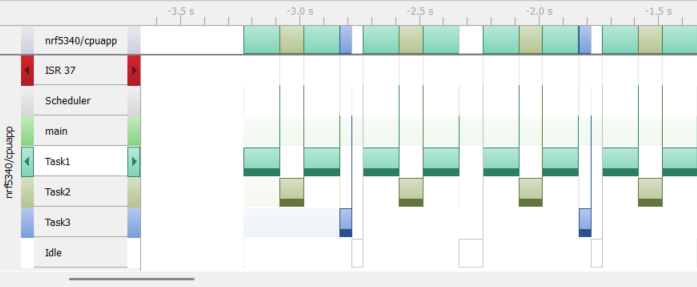
If you correctly implement the program correctly and use the SEGGER SystemView tool, you
should see a trace view similar to the following:
To capture all CarSystem events from the beginning in the SEGGER SystemView tool, one option is to add a sleep to the main() function before starting the CarSystem instance:
#ifdef CONFIG_SEGGER_SYSTEMVIEW
  // give us time to connect SeggerSystemView
  using std::literals::chrono_literals::operator""s;
  zpp_lib::ThisThread::sleep_for(10s);
#endif // CONFIG_SEGGER_SYSTEMVIEW
Visual Validation of the Observed Results
The results obtained by the dynamic analysis of your program should correspond to the solution that you have developed for the corresponding exercise.
A very useful tool for validating the results obtained using dynamic analysis is the use of a scheduling simulator. We suggest to use this simulator. If you configure the three tasks as in the exercise and in your program, and run a simulation using the Monotonic Rate Algorithm, you should get a result similar to:
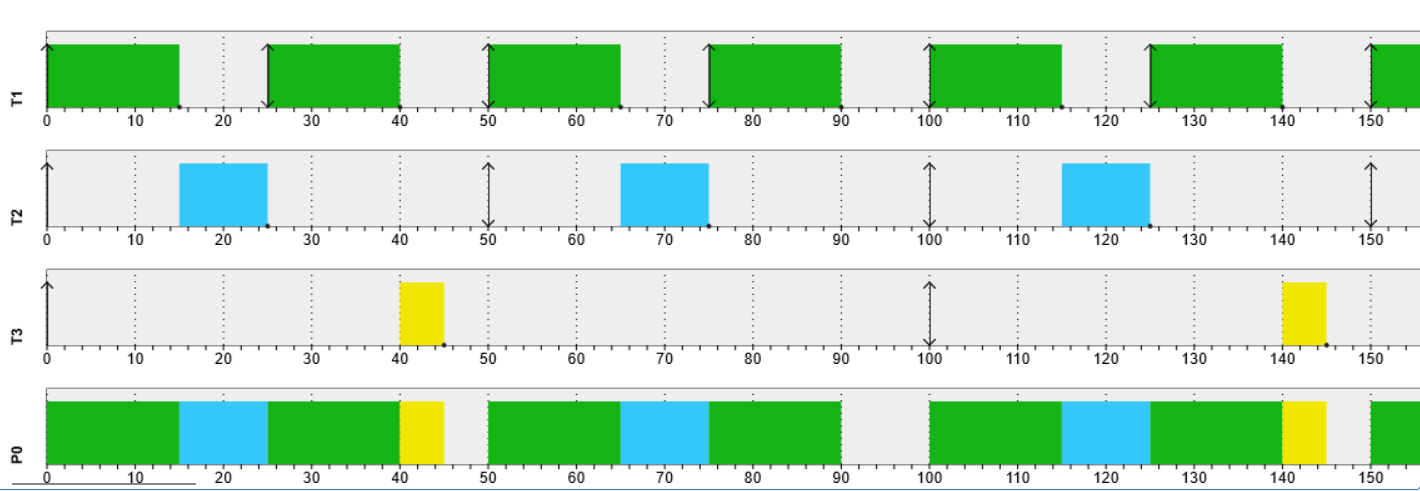
As you can see, the results obtained from the SEGGER SystemView tool are identical to the simulated results!
Statistical Validation
Although the observed results appear correct, we must validate that the computation times and periods are statistically sound and not just visually accurate. To this end, we can use the Segger SV tool as follows:
- Add calls to
SEGGER_SYSVIEW_MarkStart()/SEGGER_SYSVIEW_MarkStop()at the start/end of each task computation (e.g. right before and after the call tobusy_wait()). The marker index is the task index:src/car_system.cpp... #ifdef CONFIG_SEGGER_SYSTEMVIEW #include "SEGGER_SYSVIEW.h" #endif // CONFIG_SEGGER_SYSTEMVIEW ... void CarSystem::task_method(uint8_t taskIndex) { ... #ifdef CONFIG_SEGGER_SYSTEMVIEW // mark processing start for task SEGGER_SYSVIEW_MarkStart(taskIndex); #endif // CONFIG_SEGGER_SYSTEMVIEW ... #ifdef CONFIG_SEGGER_SYSTEMVIEW // mark processing end for task SEGGER_SYSVIEW_MarkStop(taskIndex); #endif // CONFIG_SEGGER_SYSTEMVIEW ... - Run your program and collect events using the SEGGER SystemView tool.
- Right-click in the “Event List” window, select “Export Data” and export all events in a .csv file.
- Use the Python script below for extracting statistics from the .csv file. Note that this Python script was generated with the help of Claude.ai.
Python script for computing task statistics
#!/usr/bin/env python3
"""
sysview_csv_marker_parser.py
=============================
Parse a SEGGER SystemView CSV export and extract performance marker
statistics (Start Marker / Stop Marker events).

For each marker ID the script computes:
  - Period  : time between consecutive Start Marker events
  - Duration: time between Start Marker and Stop Marker
  - Pass/Fail against configurable timing constraints

SystemView CSV format expected:
  - Separator      : comma
  - Time column    : seconds in "0.000 000 000" format (spaces as thousands sep)
  - Marker events  : "Start Marker 0x000..." / "Stop Marker 0x000..." in Event column

Usage:
  python sysview_csv_marker_parser.py recording.csv [options]

  python sysview_csv_marker_parser.py recording.csv \\
      --marker 0 --period-ms 10.0 --tolerance-ms 0.5 --max-duration-ms 3.0 \\
      --marker 1 --period-ms 20.0 --tolerance-ms 1.0

  python sysview_csv_marker_parser.py recording.csv --list-markers
  python sysview_csv_marker_parser.py recording.csv --output-csv stats.csv
"""

import argparse
import csv
import os
import re
import sys
from dataclasses import dataclass
from typing import Dict, List, Optional, Tuple


# ── Data structures ───────────────────────────────────────────────────────────

@dataclass
class MarkerEvent:
    kind:       str     # 'start' | 'stop'
    marker_id:  int
    time_s:     float   # absolute time in seconds


@dataclass
class MarkerInterval:
    marker_id: int
    start_s:   float
    stop_s:    float

    @property
    def duration_us(self) -> float:
        return (self.stop_s - self.start_s) * 1_000_000.0

    @property
    def duration_ms(self) -> float:
        return (self.stop_s - self.start_s) * 1_000.0


@dataclass
class MarkerConstraint:
    marker_id:       int
    period_ms:       Optional[float] = None
    tolerance_ms:    Optional[float] = None
    max_duration_ms: Optional[float] = None


# ── Time parser ───────────────────────────────────────────────────────────────

def parse_time_s(time_str: str) -> float:
    """
    Parse SystemView time string to seconds.
    SystemView exports time as "0.000 000 000" (spaces as visual separators).
    Examples:
      "0.000 123 456"  ->  0.000123456
      "1.234 567 890"  ->  1.234567890
      "0.010 000 000"  ->  0.01
    """
    # Remove all spaces then parse as float
    return float(time_str.replace(" ", ""))


# ── Marker ID parser ──────────────────────────────────────────────────────────

# Matches: "Start Marker 0x00000000" or "Stop Marker 0x00000001" etc.
# The hex value is the marker ID as set in SEGGER_SYSVIEW_MarkStart(id)
RE_START_MARKER = re.compile(r"Start\s+Marker\s+0x([0-9a-fA-F]+)", re.IGNORECASE)
RE_STOP_MARKER  = re.compile(r"Stop\s+Marker\s+0x([0-9a-fA-F]+)",  re.IGNORECASE)


def parse_marker_event(event_str: str) -> Optional[Tuple[str, int]]:
    """
    Parse the Event column string.
    Returns (kind, marker_id) or None if not a marker event.
    kind is 'start' or 'stop'.
    """
    m = RE_START_MARKER.search(event_str)
    if m:
        return 'start', int(m.group(1), 16)

    m = RE_STOP_MARKER.search(event_str)
    if m:
        return 'stop', int(m.group(1), 16)

    return None


# ── CSV parser ────────────────────────────────────────────────────────────────

def parse_csv(filepath: str,
              verbose:  bool = False) -> Tuple[List[MarkerEvent], List[str]]:
    """
    Parse a SystemView CSV export file.
    Returns (events, warnings).

    Skips header lines that do not look like data rows (SystemView prepends
    several metadata lines before the actual column headers).

    Expected column headers (case-insensitive, flexible ordering):
      Index, Time [s], Event, Detail, Context
    """
    events:   List[MarkerEvent] = []
    warnings: List[str]         = []

    with open(filepath, newline='', encoding='utf-8-sig') as f:
        raw_lines = f.readlines()

    # ── Find the header row ───────────────────────────────────────────────────
    # SystemView CSV files have metadata lines before the column header.
    # We find the header by looking for a line containing "Time" and "Event".

    header_line_idx = None
    for i, line in enumerate(raw_lines):
        line_lower = line.lower()
        if "time" in line_lower and "event" in line_lower:
            header_line_idx = i
            break

    if header_line_idx is None:
        print("ERROR: Could not find header row in CSV file.", file=sys.stderr)
        print("       Expected a row containing 'Time' and 'Event' columns.",
              file=sys.stderr)
        sys.exit(1)

    if verbose:
        print(f"[CSV] Header found at line {header_line_idx + 1}: "
              f"{raw_lines[header_line_idx].strip()}")

    # ── Parse data rows ───────────────────────────────────────────────────────

    data_lines = raw_lines[header_line_idx:]
    reader     = csv.DictReader(data_lines)

    # Normalise column names: strip whitespace, lowercase for lookup
    def find_col(fieldnames, *candidates) -> Optional[str]:
        """Find the first matching column name from candidates."""
        if fieldnames is None:
            return None
        for name in fieldnames:
            for candidate in candidates:
                if candidate.lower() in name.lower():
                    return name
        return None

    # We need these after the first next() call — defer until first row
    time_col  = None
    event_col = None
    row_count = 0

    for row in reader:
        row_count += 1

        # Discover column names from first row
        if time_col is None:
            time_col  = find_col(row.keys(), "time")
            event_col = find_col(row.keys(), "event")
            if verbose:
                print(f"[CSV] Columns detected: time='{time_col}'  "
                      f"event='{event_col}'")

        if time_col is None or event_col is None:
            warnings.append(f"Row {row_count}: could not identify Time/Event columns")
            continue

        time_str  = row.get(time_col,  "").strip()
        event_str = row.get(event_col, "").strip()

        if not time_str or not event_str:
            continue

        # Parse time
        try:
            time_s = parse_time_s(time_str)
        except ValueError:
            warnings.append(f"Row {row_count}: cannot parse time '{time_str}'")
            continue

        # Parse marker event
        result = parse_marker_event(event_str)
        if result is None:
            continue  # not a marker event -- skip silently

        kind, marker_id = result
        events.append(MarkerEvent(kind=kind, marker_id=marker_id, time_s=time_s))

        if verbose:
            print(f"  [row {row_count:6d}] {kind:5s}  "
                  f"marker_id={marker_id}  time={time_s:.9f}s")

    return events, warnings


# ── Analysis ──────────────────────────────────────────────────────────────────

def build_intervals(events: List[MarkerEvent]) -> Dict[int, List[MarkerInterval]]:
    """
    Match Start / Stop pairs per marker ID.
    Unmatched Start events (no following Stop) are silently ignored.
    """
    pending:   Dict[int, MarkerEvent]          = {}
    intervals: Dict[int, List[MarkerInterval]] = {}

    for evt in events:
        if evt.kind == 'start':
            pending[evt.marker_id] = evt
        elif evt.kind == 'stop':
            if evt.marker_id in pending:
                start_evt = pending.pop(evt.marker_id)
                intervals.setdefault(evt.marker_id, []).append(MarkerInterval(
                    marker_id = evt.marker_id,
                    start_s   = start_evt.time_s,
                    stop_s    = evt.time_s,
                ))

    return intervals


def compute_periods(events: List[MarkerEvent]) -> Dict[int, List[float]]:
    """
    Compute periods (in ms) between consecutive Start Marker events
    per marker ID.
    """
    last_start: Dict[int, float]       = {}
    periods:    Dict[int, List[float]] = {}

    for evt in events:
        if evt.kind == 'start':
            mid = evt.marker_id
            if mid in last_start:
                period_ms = (evt.time_s - last_start[mid]) * 1000.0
                if period_ms > 0:
                    periods.setdefault(mid, []).append(period_ms)
            last_start[mid] = evt.time_s

    return periods


# ── Statistics ────────────────────────────────────────────────────────────────

def compute_stats(values: List[float]) -> dict:
    if not values:
        return {}
    n        = len(values)
    mean     = sum(values) / n
    min_v    = min(values)
    max_v    = max(values)
    variance = sum((v - mean) ** 2 for v in values) / n
    std      = variance ** 0.5
    return {"n": n, "mean": mean, "min": min_v, "max": max_v, "std": std}


def print_stats(label: str, values: List[float], unit: str = "ms") -> dict:
    stats = compute_stats(values)
    if not stats:
        print(f"  {label}: no data")
        return {}
    print(f"  {label}:")
    print(f"    n={stats['n']}  "
          f"mean={stats['mean']:.6f}{unit}  "
          f"min={stats['min']:.6f}{unit}  "
          f"max={stats['max']:.6f}{unit}  "
          f"std={stats['std']:.6f}{unit}")
    return stats


# ── Validation ────────────────────────────────────────────────────────────────

def validate(periods_ms:  List[float],
             durations_ms: List[float],
             constraint:  MarkerConstraint) -> bool:
    all_pass = True

    # Period validation
    if constraint.period_ms is not None and constraint.tolerance_ms is not None:
        violations = [
            (i, p) for i, p in enumerate(periods_ms)
            if abs(p - constraint.period_ms) > constraint.tolerance_ms
        ]
        pass_count = len(periods_ms) - len(violations)
        print(f"  Period check  : {pass_count}/{len(periods_ms)} within "
              f"{constraint.period_ms:.3f}ms ± {constraint.tolerance_ms:.3f}ms")
        for i, p in violations:
            deviation = abs(p - constraint.period_ms)
            print(f"    FAIL period[{i}]: {p:.6f}ms  "
                  f"deviation={deviation:.6f}ms  "
                  f"(limit ±{constraint.tolerance_ms}ms)")
        if violations:
            all_pass = False

    # Duration validation
    if constraint.max_duration_ms is not None and durations_ms:
        violations = [
            (i, d) for i, d in enumerate(durations_ms)
            if d > constraint.max_duration_ms
        ]
        pass_count = len(durations_ms) - len(violations)
        print(f"  Duration check: {pass_count}/{len(durations_ms)} within "
              f"{constraint.max_duration_ms:.3f}ms")
        for i, d in violations:
            print(f"    FAIL duration[{i}]: {d:.6f}ms > "
                  f"max={constraint.max_duration_ms:.3f}ms")
        if violations:
            all_pass = False

    return all_pass


# ── CLI ───────────────────────────────────────────────────────────────────────

def parse_args() -> argparse.Namespace:
    p = argparse.ArgumentParser(
        description="Parse SEGGER SystemView CSV export and compute marker statistics.",
        formatter_class=argparse.RawDescriptionHelpFormatter,
        epilog="""
Examples:
  List all marker IDs found:
    %(prog)s recording.csv --list-markers

  Show statistics for all markers:
    %(prog)s recording.csv

  Validate two markers with timing constraints:
    %(prog)s recording.csv \\
        --marker 0 --period-ms 10.0 --tolerance-ms 0.5 --max-duration-ms 3.0 \\
        --marker 1 --period-ms 20.0 --tolerance-ms 1.0

  Export per-interval stats to CSV:
    %(prog)s recording.csv --output-csv stats.csv

  Show every decoded marker event:
    %(prog)s recording.csv --verbose
""")

    p.add_argument("csv_file",
                   help="Path to SystemView CSV export file")
    p.add_argument("--verbose", "-v", action="store_true",
                   help="Print every decoded marker event")
    p.add_argument("--list-markers", action="store_true",
                   help="List all marker IDs found and exit")
    p.add_argument("--marker", type=int, action="append", dest="markers",
                   metavar="ID",
                   help="Marker ID to analyze (repeatable, decimal)")
    p.add_argument("--period-ms", type=float, action="append",
                   dest="periods", metavar="MS",
                   help="Expected period in ms (one per --marker)")
    p.add_argument("--tolerance-ms", type=float, action="append",
                   dest="tolerances", metavar="MS",
                   help="Period tolerance in ms (one per --marker)")
    p.add_argument("--max-duration-ms", type=float, action="append",
                   dest="max_durations", metavar="MS",
                   help="Max Start to Stop duration in ms (one per --marker)")
    p.add_argument("--output-csv", type=str, default=None,
                   help="Export per-interval statistics to a CSV file")

    return p.parse_args()


# ── Main ──────────────────────────────────────────────────────────────────────

def main() -> None:
    args = parse_args()

    if not os.path.isfile(args.csv_file):
        print(f"ERROR: File not found: {args.csv_file}", file=sys.stderr)
        sys.exit(1)

    # ── Parse CSV ─────────────────────────────────────────────────────────────

    print(f"Parsing {args.csv_file} ...")
    events, warnings = parse_csv(args.csv_file, verbose=args.verbose)

    for w in warnings:
        print(f"WARNING: {w}")

    print(f"Found {len(events)} marker event(s)")
    print()

    if not events:
        print("No marker events found in CSV.")
        print("Check that 'Start Marker' / 'Stop Marker' events are present")
        print("in the Event column of the CSV export.")
        sys.exit(0)

    # ── List marker IDs ───────────────────────────────────────────────────────

    all_ids = sorted(set(e.marker_id for e in events))

    if args.list_markers:
        print("Marker IDs found:")
        print(f"  {'ID (dec)':>10}  {'ID (hex)':>10}  "
              f"{'starts':>8}  {'stops':>8}")
        print(f"  {'--------':>10}  {'--------':>10}  "
              f"{'------':>8}  {'-----':>8}")
        for mid in all_ids:
            starts = sum(1 for e in events if e.marker_id == mid and e.kind == 'start')
            stops  = sum(1 for e in events if e.marker_id == mid and e.kind == 'stop')
            print(f"  {mid:>10}  {mid:#010x}  {starts:>8}  {stops:>8}")
        return

    # ── Build analysis structures ─────────────────────────────────────────────

    intervals = build_intervals(events)
    periods   = compute_periods(events)

    # ── Build constraints ─────────────────────────────────────────────────────

    constraints: Dict[int, MarkerConstraint] = {}
    if args.markers:
        for i, mid in enumerate(args.markers):
            c = MarkerConstraint(marker_id=mid)
            if args.periods       and i < len(args.periods):
                c.period_ms = args.periods[i]
            if args.tolerances    and i < len(args.tolerances):
                c.tolerance_ms = args.tolerances[i]
            if args.max_durations and i < len(args.max_durations):
                c.max_duration_ms = args.max_durations[i]
            constraints[mid] = c

    target_ids   = sorted(constraints.keys()) if constraints else all_ids
    overall_pass = True

    # ── Per-marker analysis ───────────────────────────────────────────────────

    for mid in target_ids:
        print(f"{'=' * 60}")
        print(f"Marker {mid}  ({mid:#010x})")
        print(f"{'-' * 60}")

        mid_periods_ms   = periods.get(mid, [])
        mid_intervals    = intervals.get(mid, [])
        mid_durations_ms = [iv.duration_ms for iv in mid_intervals]

        if not mid_periods_ms and not mid_durations_ms:
            print("  No start/stop data found for this marker ID.")
            print()
            continue

        period_stats   = print_stats("Periods  (Start to Start)", mid_periods_ms, "ms")
        duration_stats = print_stats("Durations (Start to Stop)",  mid_durations_ms, "ms")

        if mid in constraints:
            print("  Validation:")
            passed = validate(mid_periods_ms, mid_durations_ms, constraints[mid])
            print(f"  {'PASS' if passed else 'FAIL'}  Marker {mid}")
            if not passed:
                overall_pass = False

        print()

    # ── Summary ───────────────────────────────────────────────────────────────

    if constraints:
        print(f"{'=' * 60}")
        if overall_pass:
            print("PASS  All markers within timing constraints")
        else:
            print("FAIL  One or more markers violated timing constraints")
        print()

    # ── CSV export ────────────────────────────────────────────────────────────

    if args.output_csv:
        with open(args.output_csv, "w", newline='') as f:
            writer = csv.writer(f)
            writer.writerow([
                "marker_id", "marker_id_hex",
                "interval_index",
                "start_s", "stop_s",
                "duration_ms", "period_ms"
            ])

            for mid in sorted(intervals.keys()):
                mid_intervals  = intervals[mid]
                mid_periods_ms = periods.get(mid, [])

                for i, iv in enumerate(mid_intervals):
                    period_ms = mid_periods_ms[i] if i < len(mid_periods_ms) else ""
                    writer.writerow([
                        mid,
                        f"{mid:#010x}",
                        i,
                        f"{iv.start_s:.9f}",
                        f"{iv.stop_s:.9f}",
                        f"{iv.duration_ms:.6f}",
                        f"{period_ms:.6f}" if period_ms != "" else "",
                    ])

        print(f"Per-interval statistics exported to {args.output_csv}")

    # Exit code suitable for CI pipelines
    if constraints:
        sys.exit(0 if overall_pass else 1)


if __name__ == "__main__":
    main()
- If you run the command
python car_system\csv_marker_parser.py --marker 0 --marker 1 --marker 2 car_system\car_system_events.csv, you can print raw statistics for each marker, similarly to:
Parsing car_system\car_system_events.csv ...
Found 175 marker event(s)

============================================================
Marker 0  (0x00000000)
------------------------------------------------------------
  Periods  (Start to Start):
    n=49  mean=249.997509ms  min=249.877930ms  max=250.030517ms  std=0.019337ms
  Durations (Start to Stop):
    n=50  mean=150.011596ms  min=149.902343ms  max=150.115966ms  std=0.050364ms
  Validation:
  PASS  Marker 0

============================================================
Marker 1  (0x00000001)
------------------------------------------------------------
  Periods  (Start to Start):
    n=24  mean=499.994914ms  min=499.908447ms  max=500.091553ms  std=0.050351ms
  Durations (Start to Stop):
    n=25  mean=244.079590ms  min=99.945068ms  max=250.213623ms  std=29.421407ms
  Validation:
  PASS  Marker 1

============================================================
Marker 2  (0x00000002)
------------------------------------------------------------
  Periods  (Start to Start):
    n=12  mean=999.997457ms  min=999.847412ms  max=1000.152587ms  std=0.094439ms
  Durations (Start to Stop):
    n=12  mean=50.008138ms  min=49.957275ms  max=50.048828ms  std=0.022746ms
  Validation:
  PASS  Marker 2

============================================================
PASS  All markers within timing constraints
python car_system\csv_marker_parser.py --marker 0 --period-ms 250 --tolerance-ms 0.1 car_system\car_system_events.csv, depending on your experimental values, you may see that one marker does not meet the set tolerance:
Parsing car_system\car_system_events.csv ...
Found 175 marker event(s)

============================================================
Marker 0  (0x00000000)
------------------------------------------------------------
  Periods  (Start to Start):
    n=49  mean=249.997509ms  min=249.877930ms  max=250.030517ms  std=0.019337ms
  Durations (Start to Stop):
    n=50  mean=150.011596ms  min=149.902343ms  max=150.115966ms  std=0.050364ms
  Validation:
  Period check  : 48/49 within 250.000ms ± 0.100ms
    FAIL period[0]: 249.877930ms  deviation=0.122070ms  (limit ±0.1ms)
  FAIL  Marker 0

============================================================
FAIL  One or more markers violated timing constraints
Wrap-Up
By the end of this codelab, you should have completed the following steps:
- You created the
CarSystemapplication that implements the three periodic tasks as specified in this exercise. - In your program, each periodic task runs in a separate thread with the priority based on its period (Rate Monotonic scheduling).
- You visually validated that the tasks run as designed and simulated.
- You statistically validated that the task periods and computation times are as expected.