Project Specification
The project of the present course will aim to use a (very very) simplified
car and applying what learned in the lectures to a “real” use case.
 (Source: https://cdn.motor1.com/images/mgl/rKoeb9/s1/la-peugeot-104-peugette-con-un-solo-sedile.jpg)

You are going to build a system composed by:
- injection system controller1
- car infosystem
- wipers
- proximity sensor2
- vehicle health analysis
1: it is a simple car but still holding a working engine
2: we do not like paying high insurance fees because we run over
pedestrians, do we?
The car simulator
Our car simulator implements the following behaviors:
- It is made of a mix of periodic / aperiodic tasks.
- Tasks may access shared resources and thus dependent of each other.
- Some tasks have hard real-time constraints, so you have to show that these constraints are met.
- The software is implemented using safety features, as explained in the related codelabs.
Phases
The software will be implemented in several phases as listed below. The deadlines for delivering the deliverables of each phase are described in the plan. The deliverables must be made available as defined in the project organization section
Once the infrastructure of the project is setup, the phases of the project are:
- Setting up the infrastructure of the project (Phase 0).
- Simulation and implementation of independent periodic tasks (Phase A).
- Integration of aperiodic tasks (Phase B).
- Integration of shared resources among tasks and of safety concepts (Phase C).
All phases contain deliverables detailed in each section below.
Phase 0: Setting up of the infrastructure
Once you have completed the Scheduling of periodic tasks codelab and the Robust Development Methodologies codelab, the basic infrastructure for starting the project will be in place. Use the code base Scheduling of periodic tasks codelab as base for your GitHub repository whose name is TeamName-car-sim.
Warning
Make sure all code written by you does follow MISRA as well as Google’s10 C++ Style guidelines.
Phase A: Periodic tasks
The car simulator must implement the following periodic tasks:
| Task | Function | WCET [ms] | Period [ms] | \(\Phi\) |
|---|---|---|---|---|
| Engine | Performs car engine checks periodically | 10 | 50 | 0 |
| Display | Displays car information | 15 | 125 | 0 |
| Tire | Performs tire pressure checks | 10 | 200 | 0 |
| Rain | Performs rain detection | 25 | 250 | 0 |
Phase A Deliverables
Based on the instructions in the Scheduling of periodic tasks codelab, you must:
Expected Deliverables and Additional Requirements
-
Demonstrate that this set of tasks is feasible using RMA and simulate this set of tasks.
- Deliverable: the
README.mdfile at the root of the project must contain the demonstration of the schedulability of the task set by the Rate Mononotic Algorithm and a screenshot of the results obtained using the simulator. You must also upload the simulator configuration file in json format onto your repository.
- Deliverable: the
-
Implement this set of tasks with a multi-tasking program using Zephyr RTOS.
- Requirement: All written code shall follow the project structure described in the Getting Started codelab using the T3 forest topology.
- Requirement: All the work is done on a dedicated
git branchnamedphase_aand merged once the tasks are completed. The merge shall happen through a Pull Request (PR) so as to ensure proper code review (so, do not forget to add a reviewer 😉) - Requirement: The phase between the different tasks must be \(0\), meaning that the start of the period of the first instance of all tasks is the same.
- Requirement: As in the related
codelab,
computing time must be implemented using a busy wait (e.g. by using the
zpp_lib::ThisThread::busy_wait()function). - Requirement: Each task is implemented as documented in the Scheduling of periodic tasks codelab.
- Requirement: The application is delivered with logging disabled and ready for tracing. Assertions are enabled.
- Requirement: All written code shall follow MISRA C++:2023 guidelines as seen in the course. For this purpose, you must apply all code analysis and all possible fixes to your source code as described in
related Robust Development Methodologies - Formal codelab and related Robust Development Methodologies - SW quality codelab.
Note: obviously only the rules defined as applicable are to be checked. - Requirement: the project shall have a pipeline covering
pre-commitandmisra_checkeras per Robust Development Methodologies - Formal.
Note: obviously only the rules defined as applicable are to be checked. - Deliverable: A screenshot of the dynamic analysis of your program using
SEGGER SystemView must also be added to the
README.md. Note that it is expected that dynamic analysis results show the same application behavior as modeled and simulation analysis. -
Deliverable: The data collected using the SEGGER SystemView tool is saved in a
phase_a.csvfile that is uploaded to the root of your GitHub repository, with the following requirements:- The
README.mdfile documents the statistical analysis of the data and shows that the period and computation times are as expected, with a tolerance of \(0.2 ms\). - You must use v1.3 of the
csv_marker_parser_with_preemption.pypython script. - To validate your implementation, you must use a command similar to
python csv_marker_parser_with_preemption.py phase_a.csv --marker 0 --task Engine --period-ms 50 --max-exec-ms 10.1 --marker 1 --task Display --period-ms 125 --max-exec-ms 15.1 --marker 2 --task Tire --period-ms 200 --max-exec-ms 10.1 --marker 3 --task Rain --period-ms 250 --max-exec-ms 25.2 --tolerance-period-start-ms 0.1. - The
tolerance-period-start-msparameter may need to be adapted to your specific experiments, but it should not exceed \(1 ms\). The exact command line used for running the script must be documented in theREADME.mdfile, together with the the statistical analysis results.
- The
-
Deliverable: the source code of your application in your github repository with the tag/release
PhaseA.
Solution
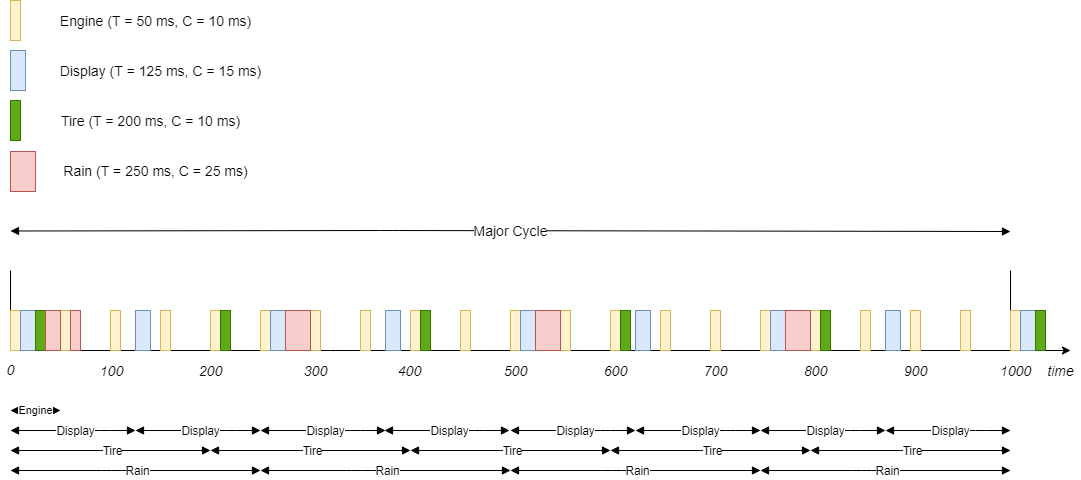
50/125/200/250 | 10/15/10/5
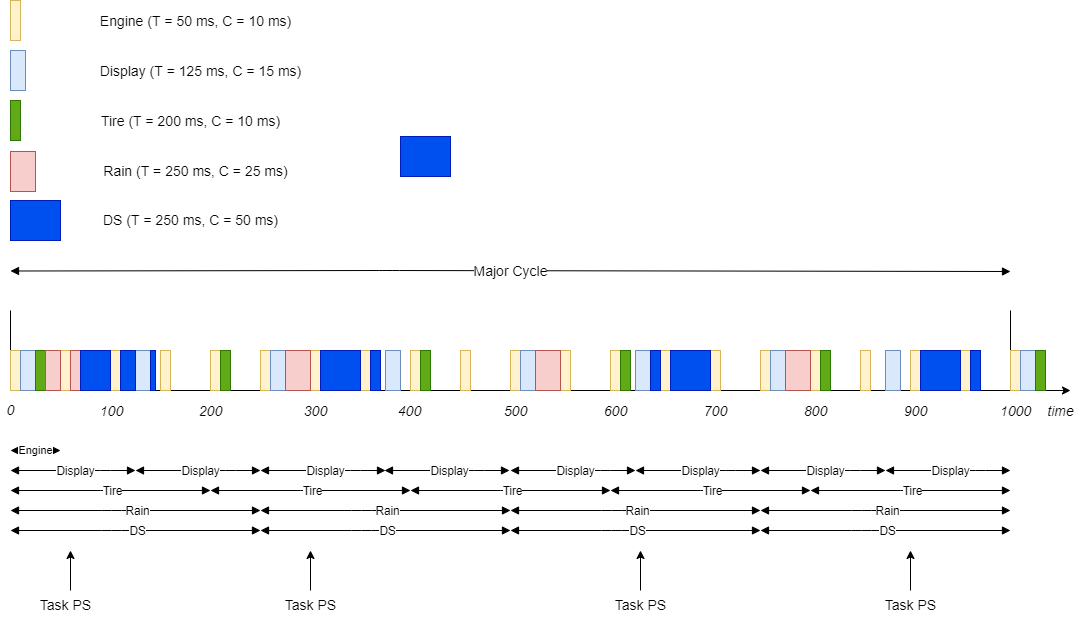
- Major Cycle = \(ppmc(T_{1}, T_{2}, T_{3}, T_{4}) = 1000ms\)
- Upper bound is \(4 * (2^{(\frac{1}{4})} - 1) \approx 0.757\)
- \(\sum_{1}^{4}(\frac{C_i}{T_i}) = \frac{1}{5} + \frac{3}{25} + \frac{1}{20} + \frac{1}{10} \approx 0.47\)
Solution

Solution

Phase B: Mix of periodic and aperiodic tasks
Ensuring quality
Before addressing the details about new functionality of Phase B, let us consider
ensuring good product quality. A good practice for developing qualitatively
good products is to only develop new functionality on dedicated branches so as
to preserve the main branch from undesired consequences (for instance, a new
instance introducing instabilities).
For doing so systematically, one would protect the main branch - that is, one
cannot commit to main directly any longer but is obliged to create a specific
branch and then merge changes into main after checks have been passed. Those
checks can be mechanical (automated tests) as well as humans (code reviews). So,
for Phase B you will use this already and to activate the protection you will
need to :
-
In order to protect the quality of the
mainbranch, usually this is protected. Protected in this context means that no changes are accepted without application of the four eye principle (see at the bottom of the page for a definition).
In order to activate the protection, you need to :- go to your repository Settings and click on Branches
- there you need to choose Branch protection rules and Add rule
- once the Add rule page opens up, fill in the information as
per the following picture:
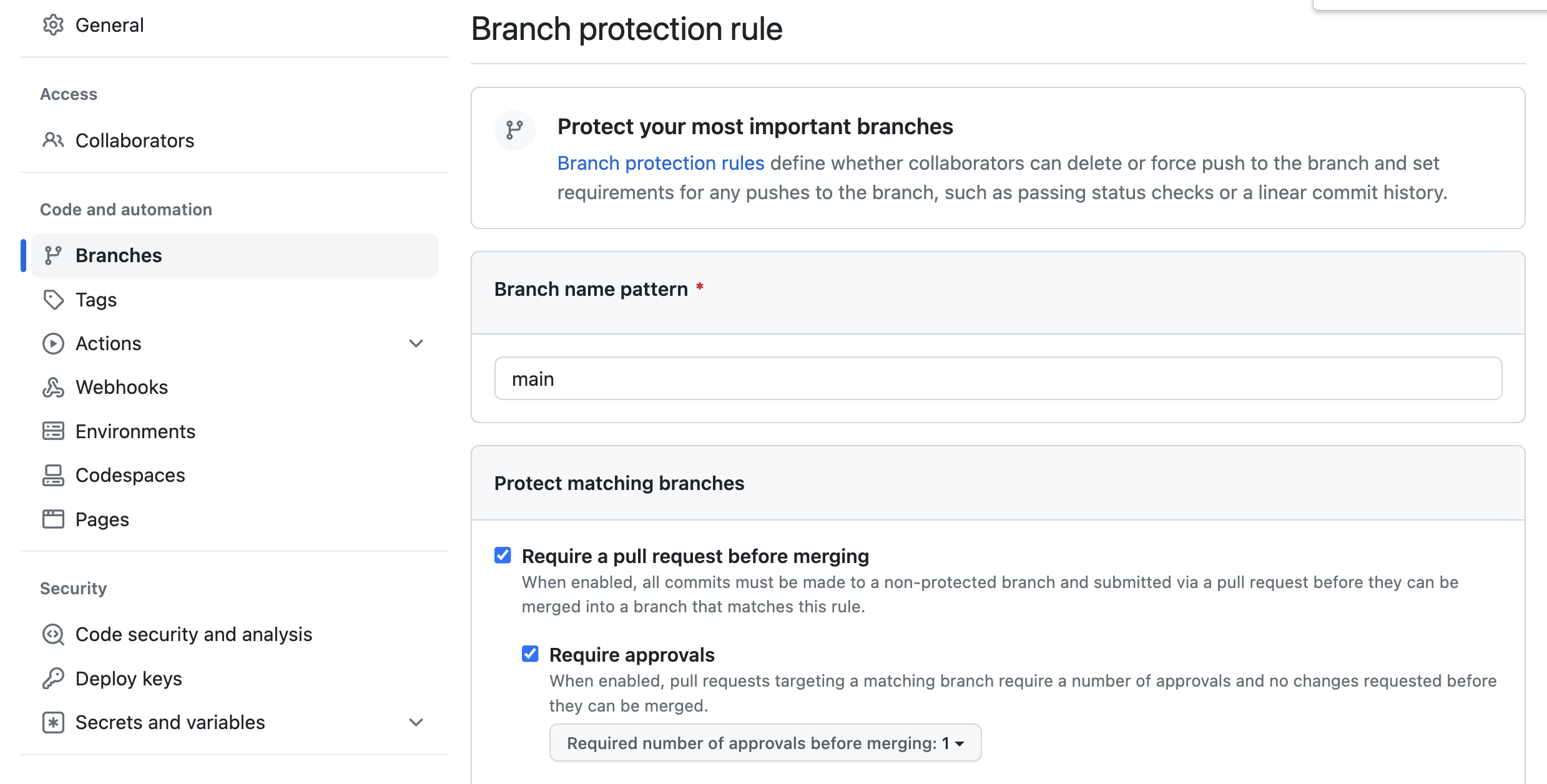 Although not in the picture, one may add more checks to this stage (e.g.
“Require status checks to pass before merging”)
Although not in the picture, one may add more checks to this stage (e.g.
“Require status checks to pass before merging”)
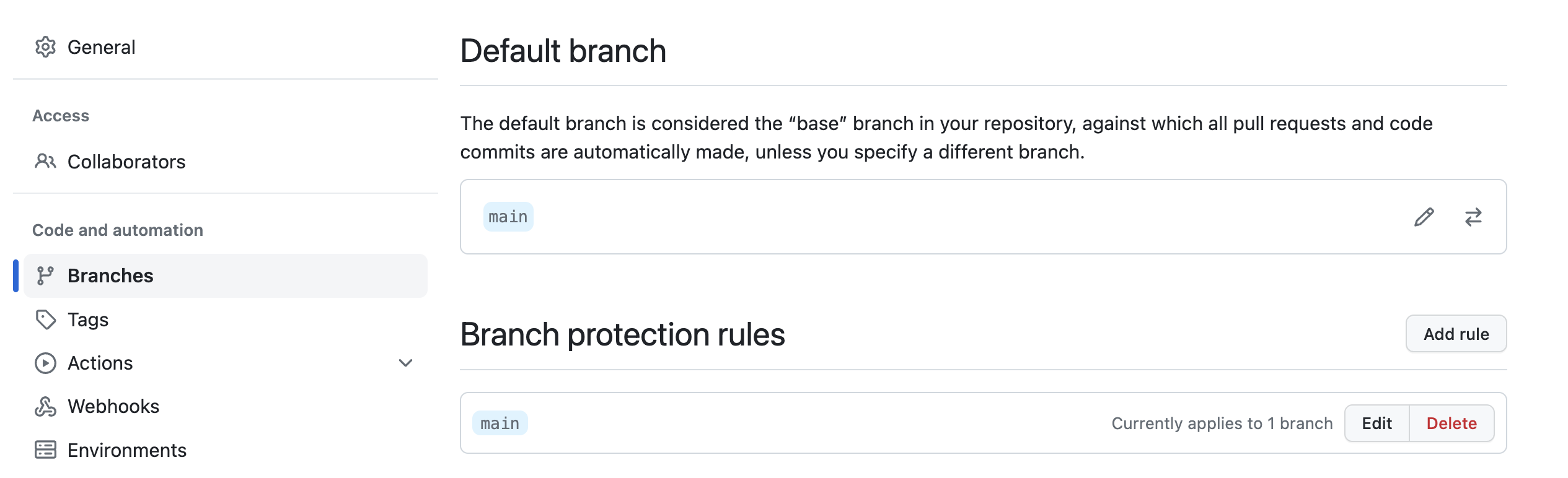
-
When are finished, you should be able to see the following:
-
Once a fix is available, you shall create a Pull Request
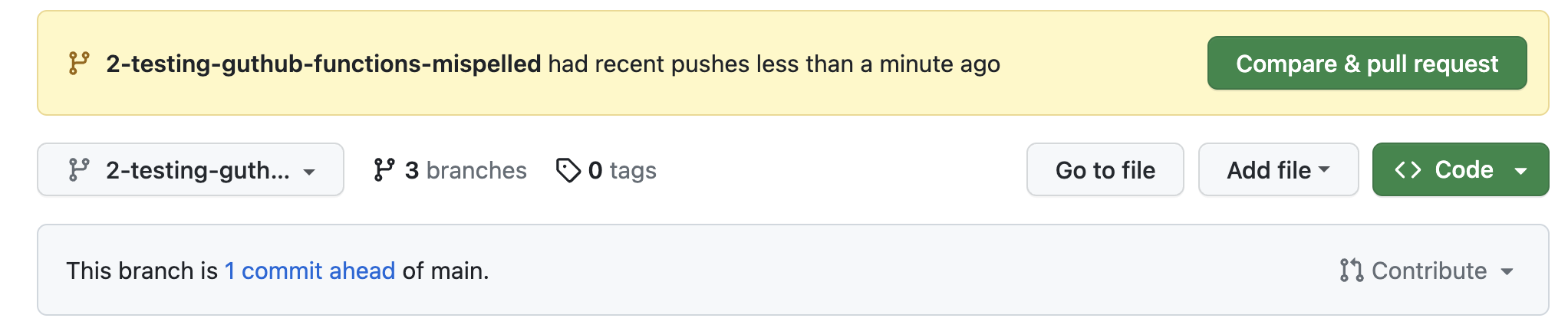
- When you are creating the pull request, you shall define at least one
reviewer. Normally, at least the issue issuer shall be invited to review
the correction.
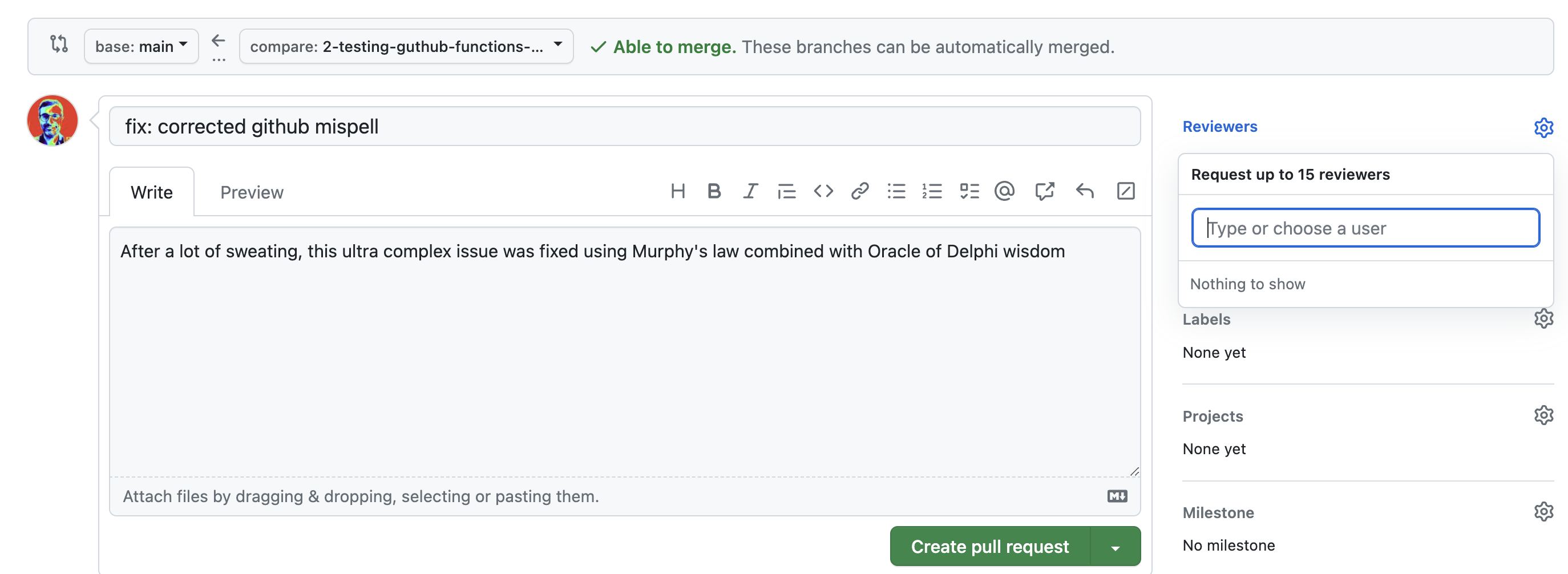
- After the reviewer has approved the change, for as long as there are no
conflicts, the merge can occur into
main. It can even do automatically if one chooses so (Enable auto-merge).
Warning
Once branch protection is installed, this needs to be respected for bug fixing as well. Not only is this good practice (see Note 2 of Robust Development Methodologies(II)), but it also works for everyone - contrary to bypassing branch protection that only works for administrators.
Phase B features
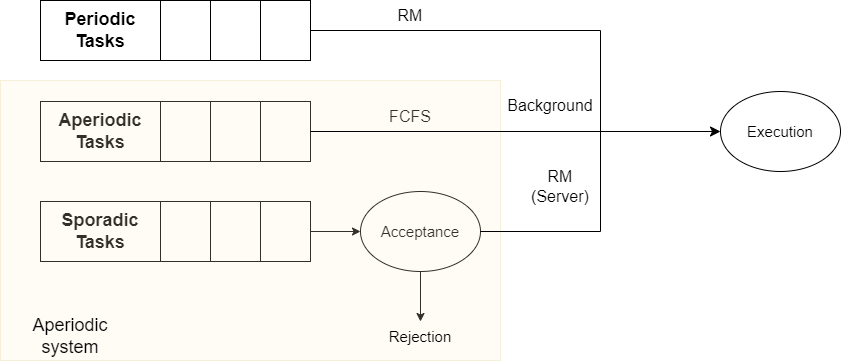
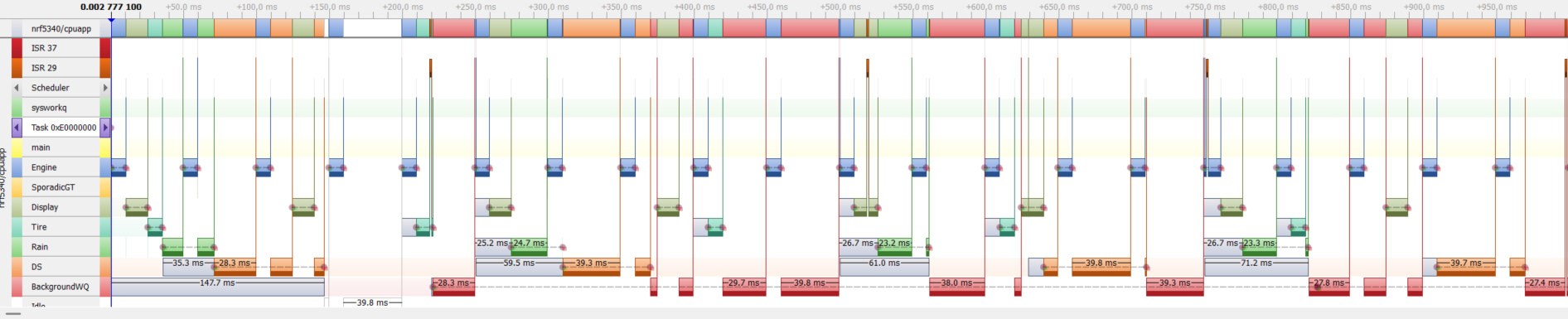
The goal of Phase B is to implement a system with three components, as illustrated below:
- The set of periodic tasks described in the Phase A section is executed using the Rate Monotonic scheduling algorithm.
- Given this set of periodic tasks, a Deferrable Server task is added to the
system. The period of this task is chosen so that the schedulability of the
entire set of periodic tasks is preserved. Note that while sporadic tasks may
usually be rejected by an acceptance test, we do not implement this behavior
in this project. This code is enabled/disabled with the
CONFIG_APERIODIC_TASKSconfiguration option. -
A system and task watchdogs are added to the project. All tasks (except the idle task) are to be monitored. The timeout values correspond to the deadline specified for each task. For tasks not having a real time constraints, use 1 second as timeout value. In addition, reset reason is retrieved and the number of watchdog triggered resets is recorded. All tasks violating the refreshing time requirement shall print a corresponding error
This code is enabled/disabled with the[00:00:00.250,305] <err> car_system: Reboot Cause: WATCHDOG RESET (35 times in a row)CONFIG_APP_WATCHDOGoption. -
A background task is also added to the system. This task executes with the smallest priority among all application tasks.
In addition to the periodic tasks, the car simulator must also implement the following aperiodic tasks:
| Task | Function | WCET [ms] |
|---|---|---|
| Presence detection (PD) | Sensor detecting presence nearby the vehicle | 50 |
| Search for peripheral devices (SPD) | Detect nearby devices | 200 |
The properties of the two aperiodic tasks are as follows:
- The presence detection (PD) task is a sporadic task. It must be served through a deferrable server and the server shall be implemented as per the related codelab.
- The presence detection (PD) task arrives at the following times in each major cycle :
\(t = {60, 300, 630, 900}\).
Generation of sporadic requests shall be implemented as described here, with the appropriate changes for generating aperiodic requests continuously. - The search for peripheral devices (SPD) task must be served as a background task. It shall be implemented as in the related codelab.
Phase B Deliverables
Based on the instructions above, you shall comply to the following:
Expected Deliverables
- Requirement: All written code shall follow the project structure described in the Getting Started codelab using the T3 forest topology.
- Requirement: The application is delivered with logging disabled and ready for tracing. Assertions are enabled. To validate timing requirements (using the Python script as described below), watchdog mechanisms must be disabled.
- Requirement: The
mainbranch shall be protected and all changes are added to it through Pull Requests - Requirement: All written code shall follow MISRA C++:2023 (as per rules defined) as well as Google’s C++ Style guidelines.
- Deliverable: The source code of your application in your github repository
with the tag/release
PhaseBand the work on new features realized on a dedicated branch namedPhaseB_Features. - Deliverable: The code implements a deferrable server and the background task processing as per the related codelab. This code is enabled with the
CONFIG_APERIODIC_TASKS=yoption. - Deliverable: Reset reason, retained memory, system watchdog and task watchdogs for all tasks as per related codelab are implemented. This code is enabled using the Zephyr RTOS configuration options as documented in the codelab - Make sure the activation of watchdogs, reset reasone and retain memory subsystems follows what is indicated in the codelab.
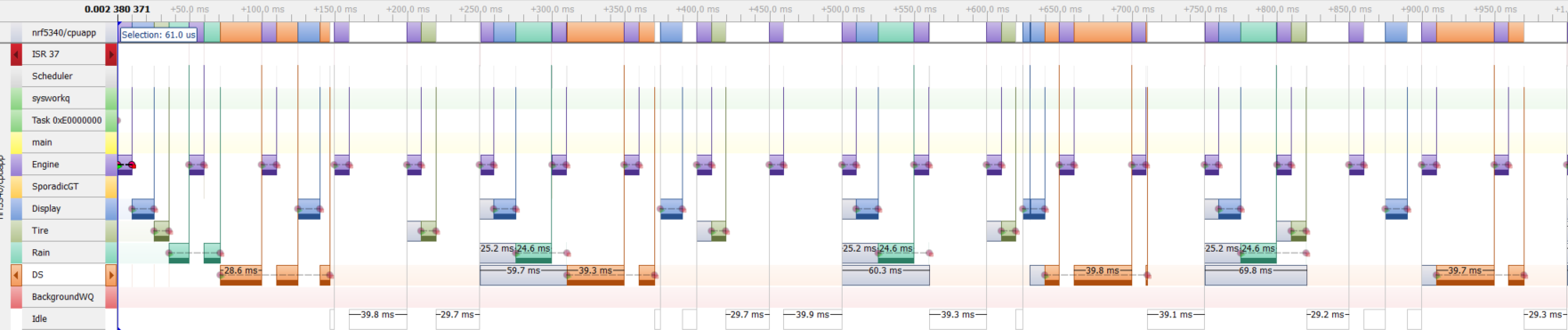
- Deliverable: A screenshot of the dynamic analysis of your program using SEGGER SystemView must be added to the
README.md. -
Deliverable: The data collected using the SEGGER SystemView tool is saved in a
phase_b.csvfile that is uploaded to the root of your GitHub repository, with the following requirements:- The
README.mdfile documents the statistical analysis of the data and shows that the period and computation times are as expected, with a tolerance of \(0.2 ms\). This bound may be adapted but it should not exceed \(0.5 ms\). - You must use v1.3 of the
csv_marker_parser_with_preemption.pypython script. - To validate your implementation, you must use a command similar to
python car_system/csv_marker_parser_with_preemption.py car_system/phase_b.csv --marker 0 --task Engine --period-ms 50 --max-exec-ms 10.2 --marker 1 --task Display --period-ms 125 --max-exec-ms 15.2 --marker 2 --task Tire --period-ms 200 --max-exec-ms 10.2 --marker 3 --task Rain --period-ms 250 --max-exec-ms 25.2 --marker 4 --task DS --period 250 --max-exec-ms 50.5 --tolerance-period-start-ms 0.7. - The
tolerance-period-start-msparameter may need to be adapted to your specific experiments, but it should not exceed \(1 ms\). The exact command line used for running the script must be documented in theREADME.mdfile, together with the the statistical analysis results.
- The
-
Deliverable: The analysis made for determining the smallest possible \(T_{S}\) that guarantees schedulability of the set of periodic tasks with the deferrable server task is added to the
README.mdfile. - Deliverable: All bugs reported as issues to your github repository for Phase A must be fixed, following the guidelines described in Bug Fixes from Phase A.
Solution
Recall: the periodic tasks are:
| Task | WCET [ms] | Period [ms] |
|---|---|---|
| Engine | 10 | 50 |
| Display | 15 | 125 |
| Tire | 10 | 200 |
| Rain | 25 | 250 |
- Standard bound: \(U_{P} <= n (K^{\frac{1}{n}} - 1)\) with \(K = \frac{U_S + 2}{2U_S + 1}\). We have \(U_p = \sum_{1}^{4}(\frac{C_i}{T_i}) = \frac{1}{5} + \frac{3}{25} + \frac{1}{20} + \frac{1}{10} = 0.47\). If one chooses \(U_S = 0.16\), then \(K = \frac{2.16}{1.32} \approx 1.63\). The bound is \(4 * (1.63^{\frac{1}{4}} - 1) \approx 0.52\). The bound is fulfilled.
-
Hyperbolic bound:
- For the periodic task set, we have with \(P = \prod_{i=1}^{4}{(U_{i} + 1)} = \frac{6}{5} * \frac{140}{125} * \frac{210}{200} * \frac{275}{250} = \frac{6}{5} * \frac{28}{25} * \frac{21}{20} * \frac{11}{10} = \frac{38808}{25000} \approx 1.55\),
- The schedulability is guaranteed if \(\frac{C_{S}}{T_{S}} = U_{S} <= \frac{2 - P}{2P - 1} \approx 0.21\)
- Given \(C_{S} = 50\), we have \(T_{S} >= \frac{50}{0.21} \approx 238\). We may choose \(T_{S} = 250\), for simplicity.
- Note that we choose \(C_{S} = 50\) for a server budget equal to or larger than the PD task computation time.
Bug Fixes from Phase A
After you delivered the Phase A of the project, a few issues related to your project have been created. These will need to be fixed within Phase B.
Note
Make sure to follow the rules presented in
Write Better Commit Messages.
That is, put fix: as type of your commits.
Obviously, setting the right type is valid for all commits, not just bug fixes.
In order to fix issues orderly, the proper way to do so is to create a
dedicated branch per issue and only commit the fix(es) related to that issue
on that branch. Once the fix is made available and approved, the branch created
for that purpose is deleted. Below you find a description how you shall go
about it.
Under the github project you created, under Issues,
chose the issue you intend to address and :
- Define who the issue is assigned to with the field
Assignees - Declare what type of issue it is
Labels(note: choose the correct type) - Potentially define at what milestone the issue should be fixed. In your case
add
Phase Bas milestone - Create a dedicated branch for fixing the particular issue
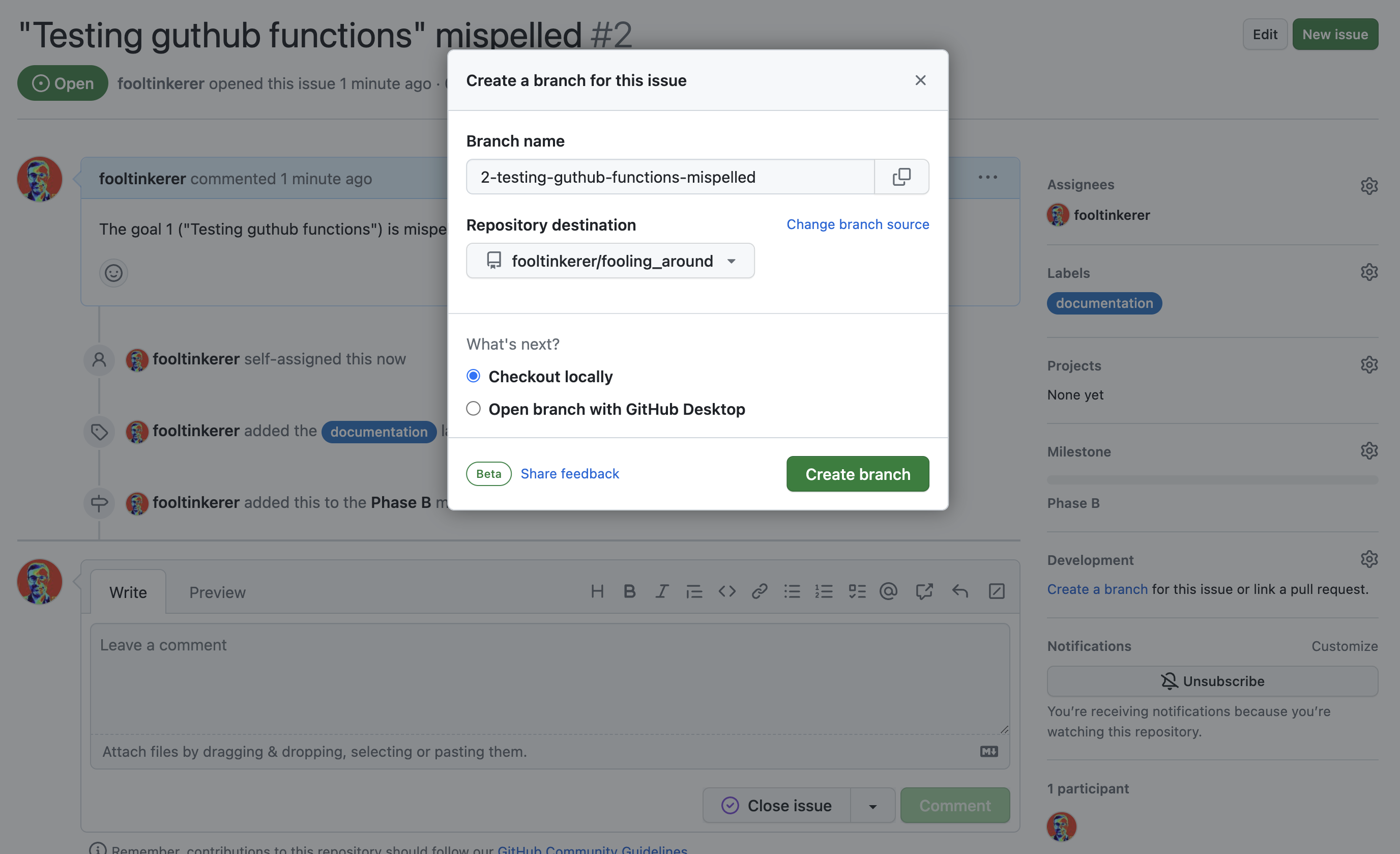 Afterwards you can pick the newly created branch to fix the issues with
the following commands
Afterwards you can pick the newly created branch to fix the issues with
the following commands
git fetch origin git checkout 2-testing-guthub-functions-mispelled - Go about fixing the issue and commit to the newly created branch
Or (as the example was fixed directly in github)
  git add README.md
  git commit -m "fix: corrected github mispell"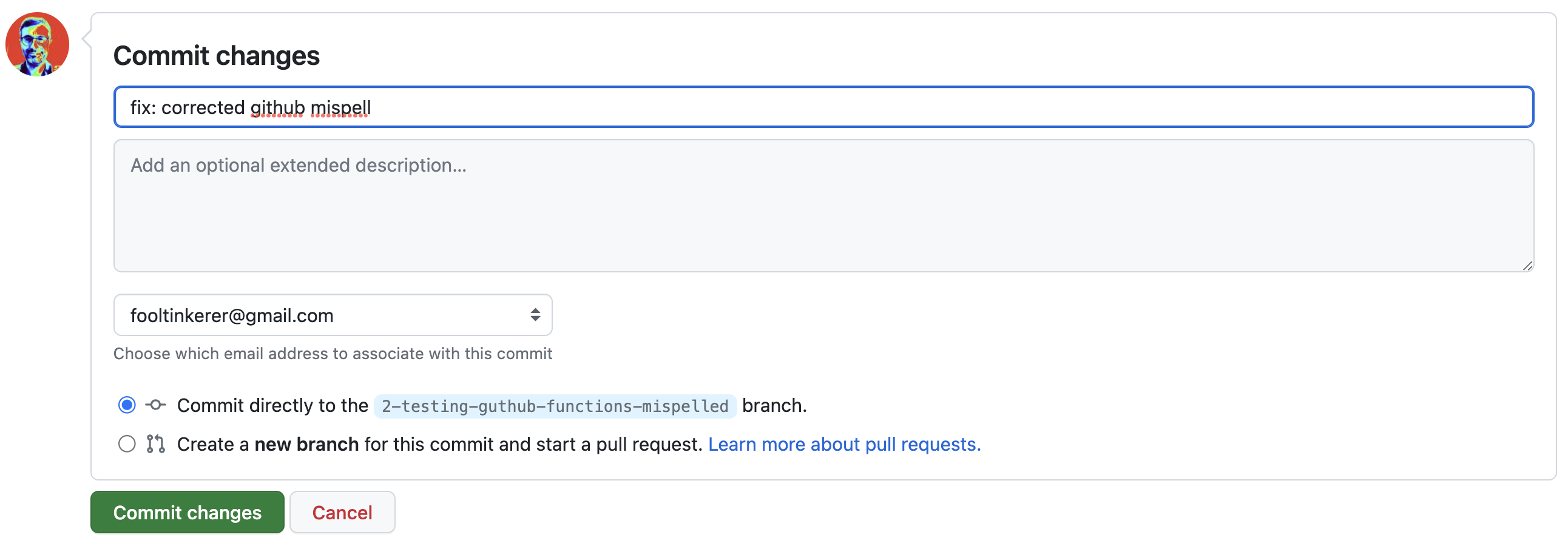
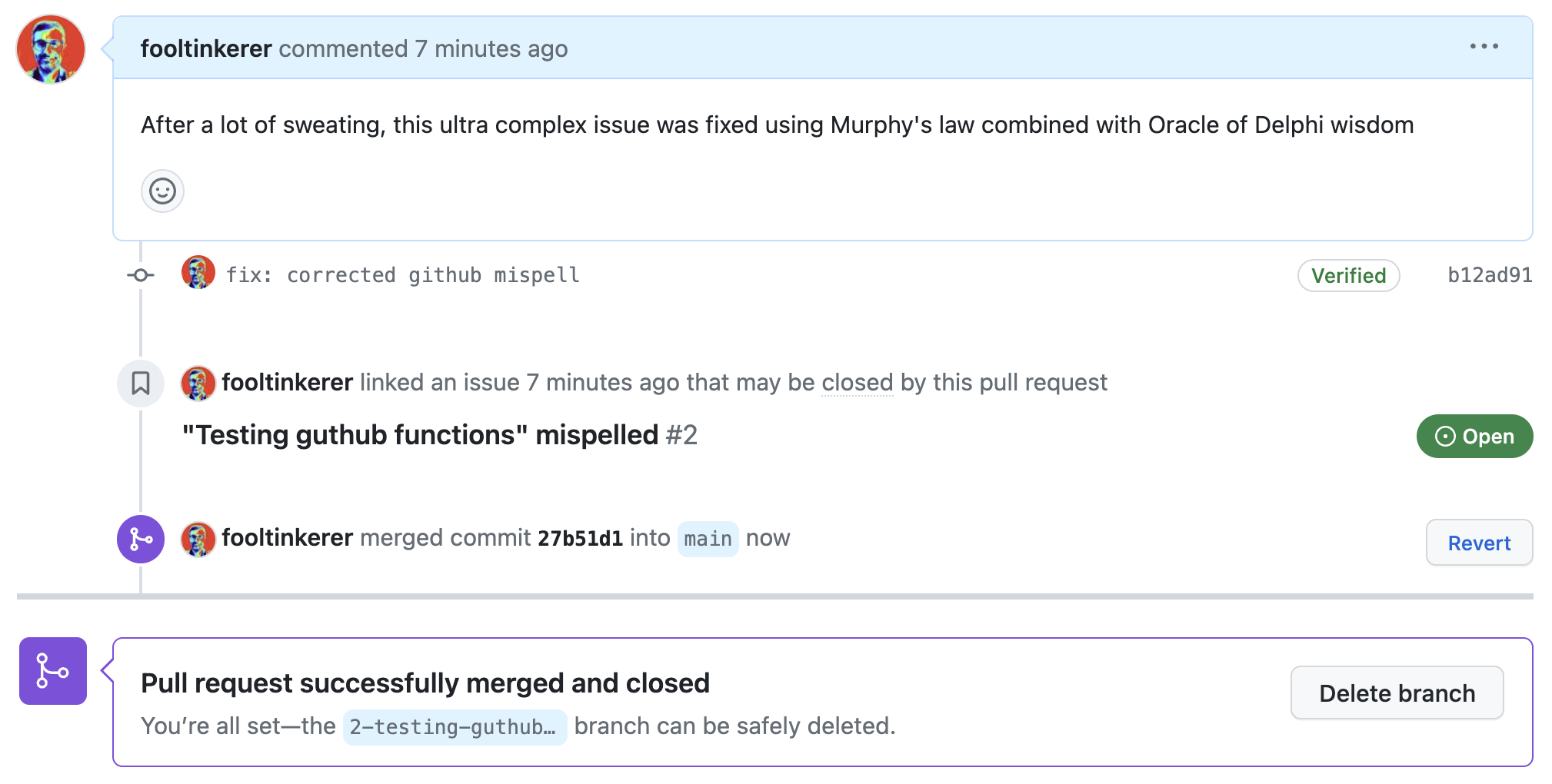
- When the merge has been done, you should delete the specific branch created
for fixing the issue (see Delete branch in picture below)
Note
Make sure you replace 2-testing-guthub-functions-mispelled in the example
above with the correct branch when you run above commands.
Quote - Four eyes principle
The Four eyes principle is a requirement that two individuals approve some action before it can be taken. The Four eyes principle is sometimes called the two-man rule or the two-person rule.
Phase C: Adding dependencies and robustness
Adding twister tests
Until now, scheduling accuracy has only been verified using tracing and statistical analysis of results. This method is useful during the initial conception and early development phases. However, it is also important to build a fully automated test framework that validates scheduling correctness. For this project, the test framework is provided, and you only need to integrate it into your application to validate scheduling. The required steps are as follows:
- Integrate the
TaskRecorderclass into yourCarSystemapplication. -
When
CONFIG_TESTis enabled (and only when enabled);- Add an instance of the
TaskRecorderclass for each task in theCarSystemimplementation. - Initialize all
TaskRecorderinstances properly in theCarSystemconstructor initializer list. - If you are using the
zpp_lib::Barrierto synchronize threads at startup, then modify the calls tozpp_lib::Barrier::wait()using_barrier.wait(&TaskRecorder::set_zero_time)). This is necessary for passing the zero time to allTaskRecorderinstances, similarly to what was done when collecting application traces. - Add calls to
TaskRecorder::start()/stop()at the same place as calls toSEGGER_SYSVIEW_MarkStart()/MarkStop().
- Add an instance of the
-
Integrate the test program into your
car_system/testsfolder. - Verify that your implementation passes the tests by running the
west twister -T car_system/tests/timing --test-pattern car_system.timing.phase_[ab]$ --device-testing --hardware-map my_map.yamlcommand. Note that this assumes that your target board is configured and that you created amy_map.yamlfile for your specific board. - If you encounter issues while testing, you can compile each test program separately. For example, you can use the command
west build car_system/tests/timing -t car_system.timing.phase_a. Then, you can run the program separately on the board. Note that adding any logging will break scheduling, causing all tests to fail. If you encounter scheduling issues, you will need to understand the problem by examining the trace using SEGGER SystemView. - Once the tests pass using your board, you need to update your CI/CD workflow. Modify the
twister.conf.jsonfile by adding a"tags"key “"tags": ["phase_a", "phase_b"]at the same level as the"tests"key. You also need to update thetwister.yamlworkflow definition.
Phase C Deliverables
Expected Deliverables
- Requirement: All written code shall follow the project structure described in the Getting Started codelab using the T3 forest topology.
- Requirement: All written code shall follow MISRA C++:2023 (as per rules defined) as well as Google’s C++ Style guidelines.
- Requirement: The scheduling behaviors described in the Task Dependencies and Priority Inversion codelab can be reproduced by building the
CarSystemapplication with the configuration parametersCONFIG_PERIODIC_TASKS=yandCONFIG_PRIORITY_INVERSION=y. - Requirement: The application has activated the
PROD_CONSUMER_INTEGRATED,CONFIG_USERSPACE=yas well asAPP_WATCHDOG=y. With this configuration you shall ensure that the task watchdog, for the tasks Engine and Tire, acts so as to ensure the tasks do get time slice within the defined period. In addition, the System Watchdog shall intervene if no refresh is granted within 500 ms. - Deliverable: The source code of your application in your github repository with the tag/release “PhaseC”. It includes code developed in the Task Dependencies and Priority Inversion codelab.
- Deliverable: Your
CarSystemimplementation passes the tests as described above, and a successful workflow run is shown in your repository. - Deliverable: The solution to the exercise 1 of the Task Dependencies and Priority Inversion codelab is added to the
README.mdfile. - Deliverable: The solution to the exercise 2 of the Task Dependencies and Priority Inversion codelab is added to the
README.mdfile. -
Requirement: The application has
CONFIG_APP_HW_STACK_PROTECTION=yandCONFIG_APP_CHECKER=yenabled in the userspace build configuration (prj_user_mode.conf), with the supportingCONFIG_ZPP_THREAD_POOL_SIZEadjusted so that theStackCheckerthread fits in the pool, as described in the Robust Design Patterns - Part 4 codelab. -
Requirement: Each thread’s stack is sized so that the peak usage reported by
THREAD_ANALYZER, after a representative run (>5 minutes), lies between 60 % and 80 % of the allocated size. Threads consistently below 45 % must be shrunk; threads above 80 % must be enlarged. The peak usage must be measured after the system has reached steady state — at least one full major cycle, with all periodic and aperiodic activity exercised. -
Deliverable: The
README.mdfile contains, as a dedicated section titled Stack sizing:- The
THREAD_ANALYZERwatermark report from a run of at least 5 minutes under representative workload, included verbatim as a code block. - A table listing each application thread, its previously allocated
stack size, the observed peak usage (in bytes and as a percentage),
the new stack size after right-sizing, and a one-line rationale.
The table must cover all
zpp_libthreads you created (periodic tasks, DS, background, WDT feeder, task WDT proxy,StackChecker) — not the kernel’smain,idle,sysworkqorISR0. - A short paragraph stating which of the four stack-protection mechanisms from the codelab are active in this build, which are not.
- The
-
Deliverable: all bugs reported as issues to your github repository for Phase B must be fixed on a dedicated
branchand merged intomainafterwards.
Important
DO NOT DELETE the branch until the fix has been verified by the issue writer. Doing so makes the review by the issue writer much more difficult.